You are a busy professional, constantly juggling deadlines, meetings, and an ever-growing inbox. The quest for increased productivity is not merely a desire; it is a necessity for maintaining professional equilibrium and achieving your ambitious goals. This article outlines a comprehensive productivity system designed to streamline your workflow, optimize your time management, and ultimately empower you to achieve more with less stress. Think of it as constructing a sturdy framework for your professional life, each component interlocking to create a resilient and efficient operational structure.
Before you can build an effective system, you must first understand the existing landscape of your work. This involves a meticulous examination of your current habits, responsibilities, and inefficiencies. Imagine yourself as an architect, surveying the terrain before designing a magnificent structure. Without this initial assessment, any subsequent efforts will be akin to building on shifting sand. Discover the [best productivity system](https://youtu.be/yTq5OM-YhRs) to enhance your daily workflow and achieve your goals efficiently.
Task Identification and Categorization
Your first step is to catalog every single task that occupies your professional plate. This is not a superficial list; it demands a deep dive into the minutiae of your daily activities.
- Brain Dump: Dedicate a specific block of time – 30 to 60 minutes – to simply list every task, no matter how small, that you are responsible for. This includes projects, recurring duties, administrative overhead, and even the “should-do” items that perpetually linger.
- Contextual Grouping: Once you have a sprawling list, begin to group tasks by context. Are there tasks that require your full concentration? Tasks that can be done during commutes? Tasks that necessitate external collaboration? Common categories include: “Deep Work,” “Communication,” “Administrative,” “Meetings,” “and “Delegable.”
- Priority Matrix (Eisenhower Matrix): Apply the Eisenhower Matrix to categorize your tasks based on urgency and importance. This classic framework divides tasks into four quadrants:
- Urgent & Important (Do First): Crises, deadlines, critical projects.
- Important, Not Urgent (Schedule): Planning, relationship building, personal development.
- Urgent, Not Important (Delegate): Interruptions, some emails, minor requests.
- Not Urgent, Not Important (Eliminate): Time-wasters, unnecessary distractions. This step helps you prune the deadwood from your task forest.
Time Tracking and Analysis
Understanding where your time currently goes is critical for identifying areas of waste and potential optimization. You cannot manage what you do not measure.
- Discrete Tracking: For a period of one to two weeks, meticulously track how you spend your time. Use a dedicated app (e.g., Toggl, Clockify) or a simple spreadsheet to log activities in 15-30 minute increments. Be honest and granular in your tracking.
- Pattern Recognition: At the end of your tracking period, analyze the data. Where are your significant time sinks? Are there recurring distractions? Are you allocating sufficient time to your “Important, Not Urgent” tasks? You might discover that a significant portion of your day is consumed by unscheduled interruptions or low-value activities.
- Time Budgeting: Based on your analysis, create a “time budget.” Allocate specific blocks of time for different types of tasks, mirroring the priority you’ve assigned them. This proactive approach prevents your day from being hijacked by reactive demands.
For busy professionals looking to enhance their productivity, exploring effective systems can be a game changer. A great resource to consider is the article found at Productive Patty, which delves into various strategies tailored specifically for those with demanding schedules. This article offers practical tips and insights that can help streamline tasks and improve overall efficiency, making it an essential read for anyone striving to maximize their productivity.
Architecting Your System: Tools and Methodologies
With a clear understanding of your current workflow, you can now begin to construct your optimized system. This involves selecting appropriate tools and adopting proven methodologies that resonate with your working style. Think of these as the specialized tools and construction techniques an architect employs to bring their design to life.
The Centralized Task Management Hub
A singular, reliable location for all your tasks is paramount to preventing information fragmentation and mental clutter. Your brain is for generating ideas, not for storing them.
- Digital Task Manager: Invest in a robust digital task manager (e.g., Todoist, Asana, Trello, Microsoft To Do). These platforms offer features such as due dates, reminders, subtasks, project organization, and collaboration capabilities. The key is consistency in its use.
- Inbox Processing: Establish a habit of regularly processing your inbox. The “inbox zero” philosophy, while sometimes perceived as extreme, emphasizes emptying your email inbox by taking action on each message: delete, delegate, defer, or do. Your email inbox should not serve as your primary task list.
- Note-Taking Integration: Link your task manager with your note-taking system (e.g., Evernote, OneNote, Notion). When an action item arises during a meeting or brainstorming session, immediately transfer it to your task manager to prevent it from getting lost in a sea of notes.
Strategic Scheduling and Time Blocking
Effective time management goes beyond merely listing tasks; it involves strategically allocating time for their completion. This is where your time budget comes into play, transformed into palpable calendar blocks.
- Calendar as Your Blueprint: Your digital calendar (e.g., Google Calendar, Outlook Calendar) should be the central repository for all your scheduled activities. Treat appointments with yourself for focused work with the same reverence as external meetings.
- Time Blocking: Dedicate specific blocks of time in your calendar for different task categories. For instance, “Deep Work” blocks for complex projects, “Communication” blocks for responding to emails and messages, and “Administrative” blocks for routine tasks. This prevents context switching and enhances focus.
- Batching Similar Tasks: Group similar tasks together and complete them in a single dedicated block. For example, process all emails at specific times, rather than constantly checking your inbox throughout the day. This minimizes the cognitive overhead associated with switching between different types of work.
Mastering Your Attention: Minimizing Distractions
In an always-on world, managing your attention is as critical as managing your time. Distractions are digital termites, silently eroding your productivity.
- Notification Management: Aggressively manage notifications on all your devices. Disable unnecessary alerts for social media, non-essential apps, and even some email accounts. Only allow critical notifications to penetrate your focus.
- Dedicated Work Environment: Create a physical and digital environment conducive to concentration. This may involve a clean desk, noise-canceling headphones, and closing irrelevant browser tabs and applications.
- “Do Not Disturb” Protocols: Establish “Do Not Disturb” periods (both physically and digitally) where you are unavailable for spontaneous interruptions. Communicate these periods to colleagues and set expectations.
Optimizing Performance: Advanced Techniques and Habits

Once your system is established, you can refine it further with advanced techniques and cultivate habits that sustain long-term productivity. These are the finishing touches and ongoing maintenance that ensure your architectural masterpiece endures.
The Power of Batching and Automation
Leveraging technology and intelligent grouping can significantly reduce the time spent on repetitive tasks.
- Batching Communications: Instead of responding to emails sporadically throughout the day, designate specific times (e.g., 9:00 AM, 1:00 PM, 4:00 PM) for processing your inbox. This shifts you from a reactive to a proactive communication stance.
- Automating Repetitive Tasks: Identify recurring tasks that can be automated through scripts, workflow tools (e.g., Zapier, IFTTT), or macros. Examples include generating reports, scheduling social media posts, or organizing files.
- Template Utilization: Create templates for frequently used emails, documents, and meeting agendas. This eliminates the need to recreate content from scratch each time, saving valuable minutes.
Strategic Delegation and Outsourcing
You cannot, and should not, do everything yourself. Effective output often hinges on the ability to leverage the skills of others.
- Identify Delegable Tasks: Refer back to your priority matrix. Tasks categorized as “Urgent, Not Important” or “Not Urgent, Not Important” are prime candidates for delegation. These are often administrative duties, data entry, or research that do not require your unique expertise.
- Clear Instruction and Expectations: When delegating, provide clear, concise instructions, define expectations, and establish appropriate deadlines. Ambiguity is the enemy of successful delegation.
- Utilize Virtual Assistants: For tasks that fall outside your team’s immediate capacity, consider outsourcing to virtual assistants or freelancers. This can be particularly effective for specialized skills or episodic workloads.
The Art of Saying “No”
Your time and attention are finite resources. Protecting them requires the ability to politely but firmly decline requests that do not align with your priorities.
- Assess Impact: Before agreeing to a new request, evaluate its impact on your existing priorities and commitments. Does it contribute to your overarching goals?
- Polite Refusal: Learn to deliver a polite but firm “no” without guilt. You can offer alternatives or suggest other individuals who might be better suited for the task. Frame your refusal as protecting your ability to deliver high-quality work on your existing commitments.
- Gatekeeping Your Calendar: Be judicious about accepting meeting invitations. Challenge the necessity of each meeting and, if possible, suggest alternative communication methods or send a delegate.
Sustaining the System: Review and Adaptation
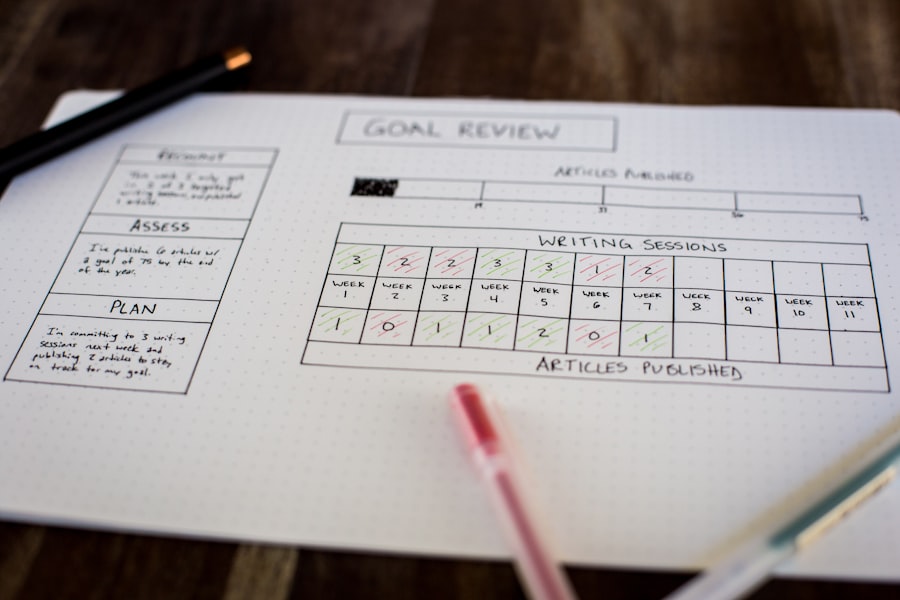
A productivity system is not a static construct; it is a living entity that requires periodic review and adaptation. Just as a building requires ongoing maintenance and occasional renovation, your system needs to evolve with your professional landscape.
Weekly Review and Planning
A dedicated weekly review is the cornerstone of system maintenance and continuous improvement.
- Reflect on the Past Week: Review your accomplishments, identify areas where you fell short, and analyze what contributed to both successes and challenges. What worked well? What didn’t?
- Process Open Loops: Clear out your inboxes (email, physical, mental), process any new ideas or tasks, and ensure everything is captured in your task management hub.
- Plan the Upcoming Week: Based on your review, strategically plan your tasks and schedule for the week ahead. Prioritize based on your goals and allocate time blocks accordingly. This proactive planning prevents you from starting the week in a reactive mode.
Quarterly and Annual Strategic Review
Beyond the weekly cadence, broader, more strategic reviews are essential for long-term alignment.
- Goal Re-evaluation: Quarterly, revisit your larger professional goals. Are they still relevant? Have new opportunities or challenges emerged that necessitate a shift in focus? Adjust your priorities accordingly.
- System Audit: Annually, conduct a comprehensive audit of your entire productivity system. Are your chosen tools still serving you effectively? Are there new methodologies or technologies that could enhance your efficiency?
- Refinement and Iteration: Be prepared to iterate and refine your system continuously. What works perfectly today might be suboptimal six months from now. View your system as a dynamic process, not a fixed solution.
By meticulously deconstructing your workflow, architecting your system with appropriate tools and methodologies, optimizing your performance with advanced techniques, and diligently sustaining it through regular review, you will not merely enhance your productivity; you will transform your entire professional output. You will move from being a reactive participant to a proactive architect of your professional success, navigating the demands of your busy professional life with greater clarity, control, and ultimately, greater achievement. This system, systematically applied, will serve as your reliable compass in the complex terrain of professional demands.
WATCH THIS! 🎯 STOP Wasting Time on the “Perfect” System
FAQs
What is a productivity system for busy professionals?
A productivity system for busy professionals is a structured approach or set of tools designed to help individuals manage their time, tasks, and priorities more effectively to maximize efficiency and achieve their goals.
Why do busy professionals need a productivity system?
Busy professionals often juggle multiple responsibilities and deadlines. A productivity system helps them organize their workload, reduce stress, avoid procrastination, and ensure important tasks are completed on time.
What are common components of a productivity system?
Common components include task management tools, prioritization methods (such as the Eisenhower Matrix), time-blocking techniques, goal setting, regular reviews, and habit tracking.
Can digital tools improve productivity for busy professionals?
Yes, digital tools like calendar apps, task managers (e.g., Todoist, Trello), and note-taking apps can streamline task organization, reminders, and collaboration, enhancing overall productivity.
How often should a productivity system be reviewed or updated?
It is recommended to review and update a productivity system regularly, such as weekly or monthly, to adjust priorities, reflect on progress, and make improvements as needed.
Is it necessary to follow a single productivity method strictly?
No, many professionals customize or combine different productivity methods to suit their unique work style and needs for optimal results.
How can busy professionals avoid burnout while using a productivity system?
Incorporating breaks, setting realistic goals, prioritizing self-care, and maintaining work-life balance within the productivity system can help prevent burnout.
Are productivity systems suitable for all types of professions?
While productivity systems can be adapted to various fields, the specific tools and techniques may vary depending on the nature of the work and individual preferences.